Live Weather: Weather Forecast
Weather Forecast - WaiWao StudioWeather
4.79.32K Reviews
- Version
- 1.1.42
- Installs
- 10.00M
- Age Rating
- Everyone
Screenshots
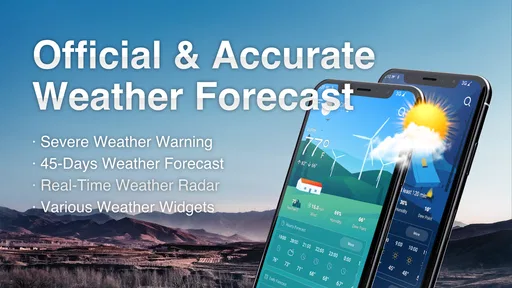
Our Review of Live Weather: Weather Forecast
 Analysis by Appyee
Have you ever found yourself caught in an unexpected rainstorm without an umbrella, or worse, a surprise snow flurry when you’re dressed for a sunny day? Well, say goodbye to those weather woes with Live Weather: Weather Forecast. This app has quickly become my go-to for all things weather-related, and I’m here to spill the beans on why it might just be your next favorite app too.
Features That Shine
Let’s dive into the features because, honestly, that’s where Live Weather: Weather Forecast really stands out. Right off the bat, the app greets you with a sleek, user-friendly interface. You don’t need to be a tech wizard to navigate through it, which is a big win in my book. The design is clean, with intuitive icons that make checking the weather feel like a breeze.
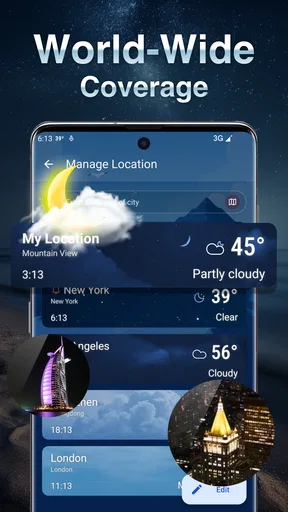
One of the coolest features is the real-time weather updates. It’s like having a personal meteorologist in your pocket. Whether it’s rain, shine, or snow, you get updates faster than you can say "weather forecast." Plus, the app covers a vast number of locations, so whether you’re planning a trip to Paris or just checking the weather in your backyard, you’re covered.
Accuracy and Reliability
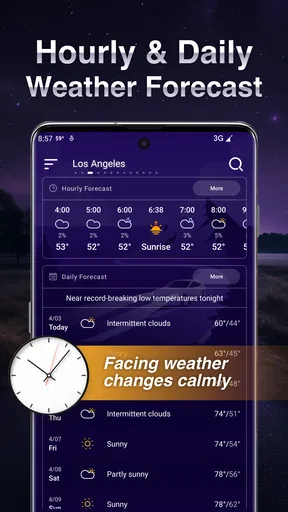
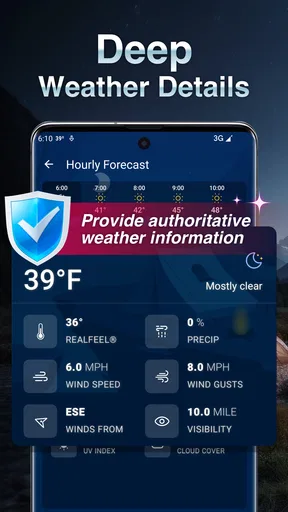
Now, what good is a weather app if it’s not accurate? I tested the app in various conditions, and I must say, it’s pretty spot on. The hourly forecasts are detailed, and you can see predictions for up to 15 days, which is perfect for planning those weekend getaways or outdoor events.
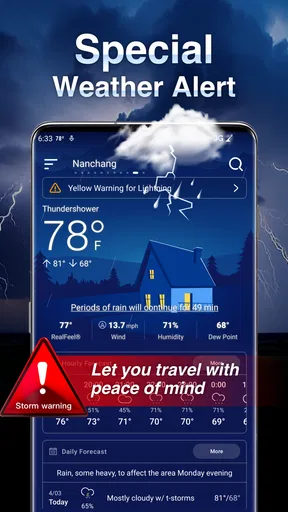
There’s also an option for severe weather alerts, which is particularly handy if you’re living in an area prone to unpredictable weather changes. You’ll get notified instantly, so you can take necessary precautions in advance.
Additional Perks
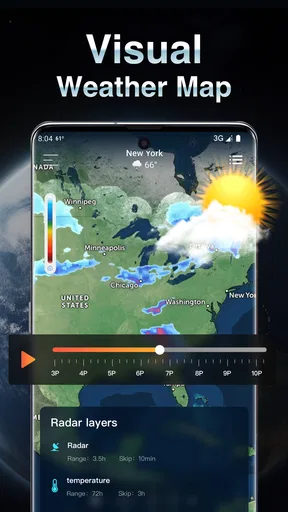
The app isn’t just about telling you if you’ll need an umbrella. It packs in some nifty extras that enhance the user experience. For instance, there’s a weather radar feature that lets you see weather patterns in motion. It’s like watching Mother Nature paint her canvas, and it’s both fascinating and useful.
I also found the wind speed and UV index details particularly helpful, especially if you’re planning outdoor activities. It’s all there at your fingertips, ensuring you’re well-prepared for whatever the day has in store.
User Experience
What makes this app a joy to use is the seamless experience it provides. The app is light and doesn’t hog your phone’s resources. It loads quickly, and switching between features is smooth as butter. Plus, it doesn’t bombard you with intrusive ads, which is a refreshing change from many free apps out there.
Another thing worth mentioning is the customization options. You can set your preferred units of measurement, choose a light or dark theme, and even customize notifications to suit your needs. It’s these little touches that make the app feel tailored to you.
Conclusion
In a world where weather can make or break our plans, having a reliable app like Live Weather: Weather Forecast is a game changer. It’s accurate, easy to use, and packed with features that not only tell you the weather but help you understand it better. Whether you’re a weather enthusiast or just someone who likes to be prepared, this app is worth downloading.
So, next time you’re planning your day, skip the guesswork and let Live Weather: Weather Forecast be your guide. It’s like having a little piece of the weather universe in your pocket, and trust me, you’ll wonder how you ever lived without it.
Privacy and Permissions
See what permissions an app requests and how it handles your data.
- Location
- approximate location (network-based), precise location (GPS and network-based)
- Phone
- read phone status and identity
- Wi-Fi connection information
- view Wi-Fi connections
- Device ID & call information
- read phone status and identity
- Other
- view network connections, send sticky broadcast, connect and disconnect from Wi-Fi, full network access, run at startup, control vibration, prevent device from sleeping, Google Play license check, read Google service configuration
Verdict
Strengths of Live Weather: Weather Forecast
- Accurate and up-to-date forecasts.
- User-friendly interface with clear icons.
- Customizable notifications for weather alerts.
- Detailed hourly and weekly forecasts.
- Interactive radar maps available.
Limitations of Live Weather: Weather Forecast
- Ads can be intrusive at times.
- Some features require a premium subscription.
- Occasional delays in radar updates.
- May consume more battery power.
- Limited widget customization options.
Similar Picks in This Category
View All
Weather - By Xiaomi
Xiaomi Inc.4.1

Weather & Radar Forecast
WetterOnline4.8

Weather
OneLouder Apps4.6

AccuWeather: Weather Radar
AccuWeather3.6

The Weather Channel - Radar
The Weather Channel4.6

1Weather Forecasts & Radar
OneLouder Apps4.3
Frequently Asked Questions
What features does Live Weather: Weather Forecast offer?
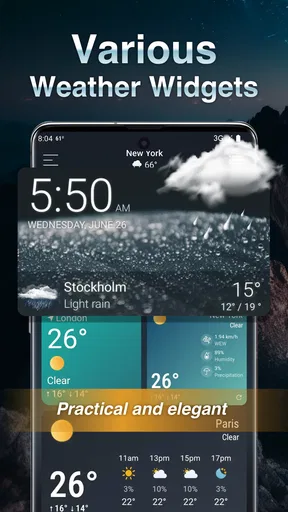
Live Weather: Weather Forecast provides real-time weather updates, detailed 7-day forecasts, and interactive radar maps. Users can customize alerts for severe weather conditions and enjoy detailed insights into temperature, humidity, wind speed, and UV index. The app also offers various widgets to display weather data on your home screen.
Is Live Weather: Weather Forecast free to use?
The app offers a free version with basic features, but for an ad-free experience and additional functionalities, such as advanced radar maps and personalized alerts, there is a premium subscription available. Users can choose monthly or annual plans according to their needs.
Can I rely on the accuracy of the weather forecasts provided by the app?
Live Weather: Weather Forecast sources data from multiple reliable meteorological organizations to ensure high accuracy. However, like any weather forecasting tool, predictions may occasionally vary due to rapidly changing conditions. Users are advised to check updates frequently, especially during severe weather events.
Does the app consume a lot of battery and data?
Live Weather: Weather Forecast is designed to be efficient, but features like real-time updates and radar maps can increase data usage. To conserve battery and data, users can adjust update frequency in settings. Enabling notifications selectively will also help manage resource consumption.
How customizable is Live Weather: Weather Forecast?
Users can personalize the app's interface by choosing different themes and setting their preferred units for temperature, wind speed, and pressure. The app also allows users to select specific locations for weather updates and customize alerts for weather changes, ensuring a tailored experience.
